Augmented Reality Data Labeling & Computer Vision Annotation

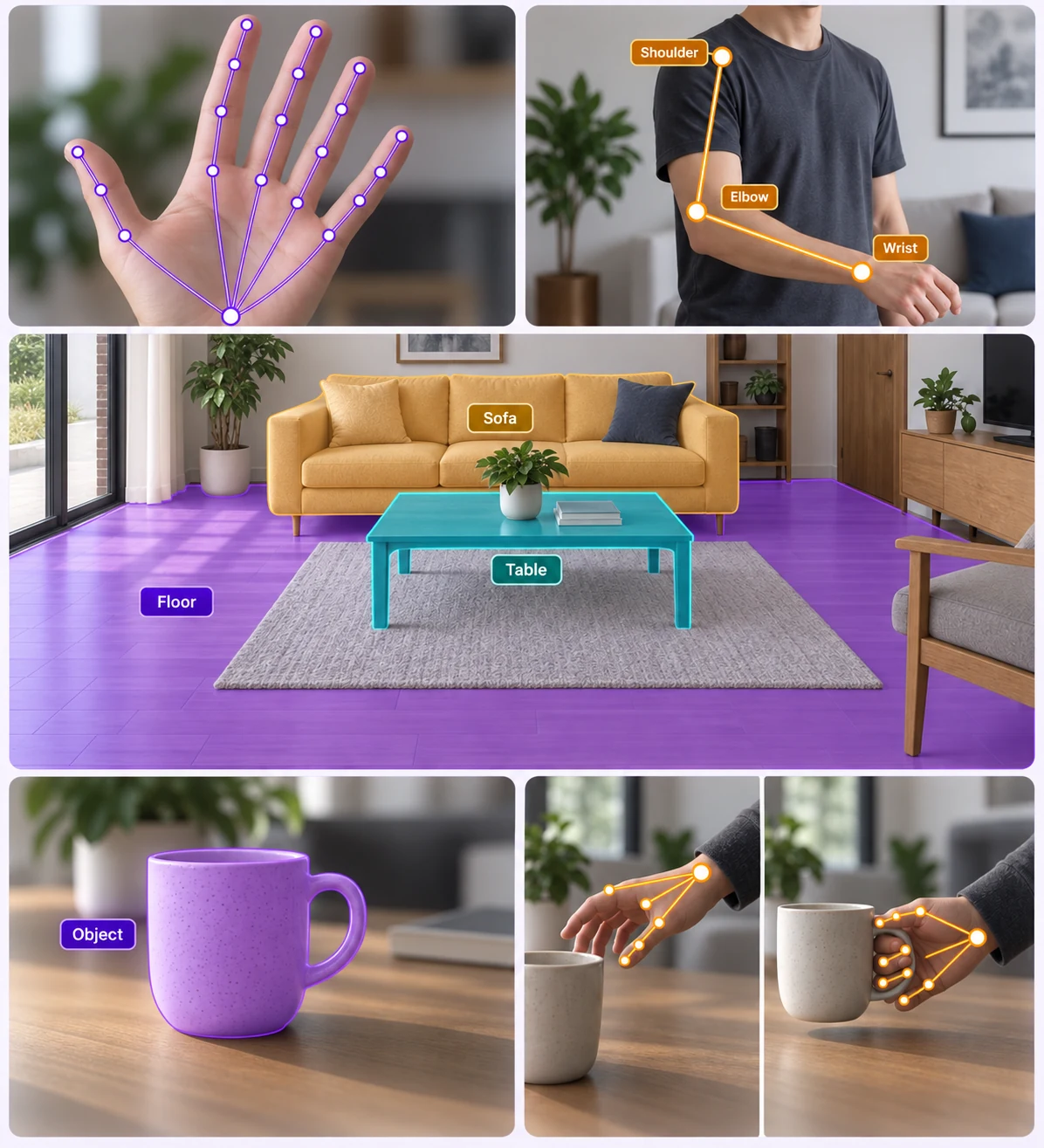
AI-powered augmented reality (AR) models enhance real-world interactions by intelligently recognizing, tracking, and overlaying digital content onto physical environments. Using computer vision and machine learning, these models enable precise object detection, spatial mapping, and real-time augmentation, improving applications in gaming, retail, healthcare, and industrial training.
Collage showing augmented reality apps on mobile devices visualizing furniture and room decor in real spaces, including a bed, sofa, table, chair, and room layout with labels and measurements.

Data Annotation for AR

Data annotation for AR enhances AI models by labeling objects, environments, and gestures for accurate real-world interactions. Techniques like bounding boxes, polygons, and keypoint annotations enable precise object tracking, spatial mapping, and augmented overlays, improving applications in gaming, retail, healthcare, and training.
Modern bedroom with a blue bed, patterned cushions, a lamp on the bedside shelves, a large potted plant, and a window showing outdoor view.

Identifies objects in AR scenes

AI-powered object identification in AR scenes enables real-time recognition and tracking of physical objects, enhancing interactive experiences. This technology supports applications in gaming, retail, education, and industrial training by seamlessly integrating digital overlays with the real world.
Modern bedroom with a green upholstered bed, beige carpet, a blue side table, and an open walk-in closet with dark doors.

Defines irregular shapes

Utilizes advanced AI to define irregular shapes, enabling precise AR object overlays. This enhances realism by ensuring digital elements seamlessly align with real-world objects, improving applications in gaming, retail, design, and training.
Modern bedroom with green bed, light green armchair, purple plant, and dark teal paneled wall.

Pixel-Level Labeling for Accurate AR Rendering

Pixel-wise labeling enables AR systems to distinguish foreground from background, enhancing object recognition, occlusion handling, and realistic digital overlays for immersive experiences in gaming, retail, and training.
Living room with two armchairs and a coffee table outlined in orange and blue 3D cuboid shapes respectively.

3D Cuboid Annotation

3D cuboid annotation enhances AR systems by providing depth and perspective awareness, allowing accurate object recognition and spatial alignment. This improves realistic interactions, occlusion handling, and immersive AR experiences in gaming, retail, and industrial applications.
3D LiDAR point cloud visualization with colored detection boxes and coordinate axes on a black background.

Lidar Annotation

LiDAR annotation for AR enhances depth perception and spatial mapping by accurately labeling 3D point cloud data. This enables precise object recognition, environment reconstruction, and realistic digital overlays, improving AR applications in navigation, gaming, and industrial design.
Close-up of a book page with green highlighted text in angled lines.

OCR

OCR in AR enables real-time text recognition and overlay, allowing users to extract, translate, and interact with printed or handwritten text in augmented reality environments. This technology enhances applications in navigation, education, retail, and accessibility by seamlessly integrating digital information with the real world.

Save Both Time and Money!

Why AI Teams Choose Unitlab

One platform to manage, annotate, and curate training data across every modality, helping teams move faster while staying efficient at scale.

15X

Faster Data Annotation
Orange square with a white check mark inside a white circle.
Auto Data Collect
Orange square with a white check mark inside a white circle.
Auto Data Labeling
Orange square with a white check mark inside a white circle.
Auto Model Validation
Orange square with a white check mark inside a white circle.
Auto QA
Orange square with a white check mark inside a white circle.
Auto Model-In-the-Loop

60%

Free Up AI Engineer’s Time
Orange square with a white check mark inside a white circle.
Dataset Curation
Orange square with a white check mark inside a white circle.
Dataset Version Control
Orange square with a white check mark inside a white circle.
Dataset QA
Orange square with a white check mark inside a white circle.
AI Model Integration
Orange square with a white check mark inside a white circle.
AI Model Validation

5X

Save AI Development Cost
Orange square with a white check mark inside a white circle.
5X saving in Data Collection
Orange square with a white check mark inside a white circle.
10X saving in Data Labeling
Orange square with a white check mark inside a white circle.
5X saving in Dataset Curation
Orange square with a white check mark inside a white circle.
5X saving in AI Development
Orange square with a white check mark inside a white circle.
5X saving in Model Validation
15X
Faster Data Annotation
60%
Free Up AI Engineer’s Time
5X
Save AI Development Cost

Annotation types

AR annotation enhances AI by labeling objects, environments, and interactions. Techniques like bounding boxes, segmentation, and keypoints improve object tracking, spatial mapping, and immersive experiences in gaming, retail, and healthcare.
Modern bedroom with a beige bed, two matching bedside tables each with a lamp, clocks on the right table, and a book on the right lower shelf.

Bounding Box for Object Detection

Bounding box annotation in AR enables precise object detection by outlining objects with rectangular boxes. This helps AR systems recognize, track, and interact with real-world objects in real time, improving applications in gaming, retail, navigation, and industrial training.

Semantic Segmentation for AR

Semantic segmentation in AR assigns pixel-level labels to distinguish objects, surfaces, and backgrounds, enabling precise digital overlays and real-world interaction. This enhances AR applications in gaming, retail, navigation, and industrial training by improving object recognition, occlusion handling, and spatial awareness.

Bright living room with large windows, a light blue sectional sofa, purple carpet, yellow ottomans, green TV stand, and colorful wall art.
Two green armchairs with patterned cushions placed on a round pink rug in a modern living space with geometric wallpaper and abstract wall art.

Polygon for AR

Polygon annotation precisely outlines irregular shapes, enabling accurate AR object overlays. This enhances realism by ensuring digital elements align seamlessly with real-world objects, improving applications in gaming, retail, design, and training.

Frequently Answered Questions

Is Unitlab AI a free data annotation tool?

Yes. You can use Unitlab AI for free, no credit card required. The free plan is great for getting started and testing workflows. If you need more scale, advanced features, or custom setups, paid plans are available.

Can I change my plan after creating an account?

Yep. Start free and upgrade anytime. Most teams begin on the free plan and move to a paid plan once their datasets or team size grow.

What types of data can I annotate with Unitlab AI?

Unitlab AI supports multimodal data annotation, including image, video, audio, text, and DICOM. You can manage and annotate different data types in one platform using the same workflows.

Does Unitlab support AI-assisted and auto-annotation?

Yes. Unitlab AI includes built-in AI models to speed up annotation with auto-labeling, tracking, and segmentation. You can review, edit, and validate everything to keep quality high.

Can I use my own AI models with Unitlab AI?

Absolutely. Unitlab supports Bring Your Own Model (BYO) workflows. You can plug in your own models, combine them with Unitlab’s built-in models, and run multiple models in a single annotation workflow.

How does pricing for data labeling services work?

Pricing depends on the type of annotation, dataset size, number of classes, and complexity. Labeling services start from $0.02 per image, with custom pricing available for multimodal and large-scale projects.

Who has access to my data?

You do. With on-premises deployments, all data stays inside your own infrastructure and Unitlab has no access to it.
 If you use Unitlab’s hosted platform, your data is encrypted and isolated, and is not visible to Unitlab staff. Access is strictly controlled and limited to your team based on roles and permissions.

Does Unitlab support team collaboration and review workflows?

It does. Unitlab is built for teams, with support for multiple annotators, reviewers, approval steps, and full annotation history so nothing gets lost.

Can Unitlab handle large datasets and production workloads?

Yes. Unitlab is designed to scale, from small experiments to production-level data annotation. Teams use it to manage large datasets, complex workflows, and long-running annotation projects.

Didn’t find the answer you are looking for? Contact our support