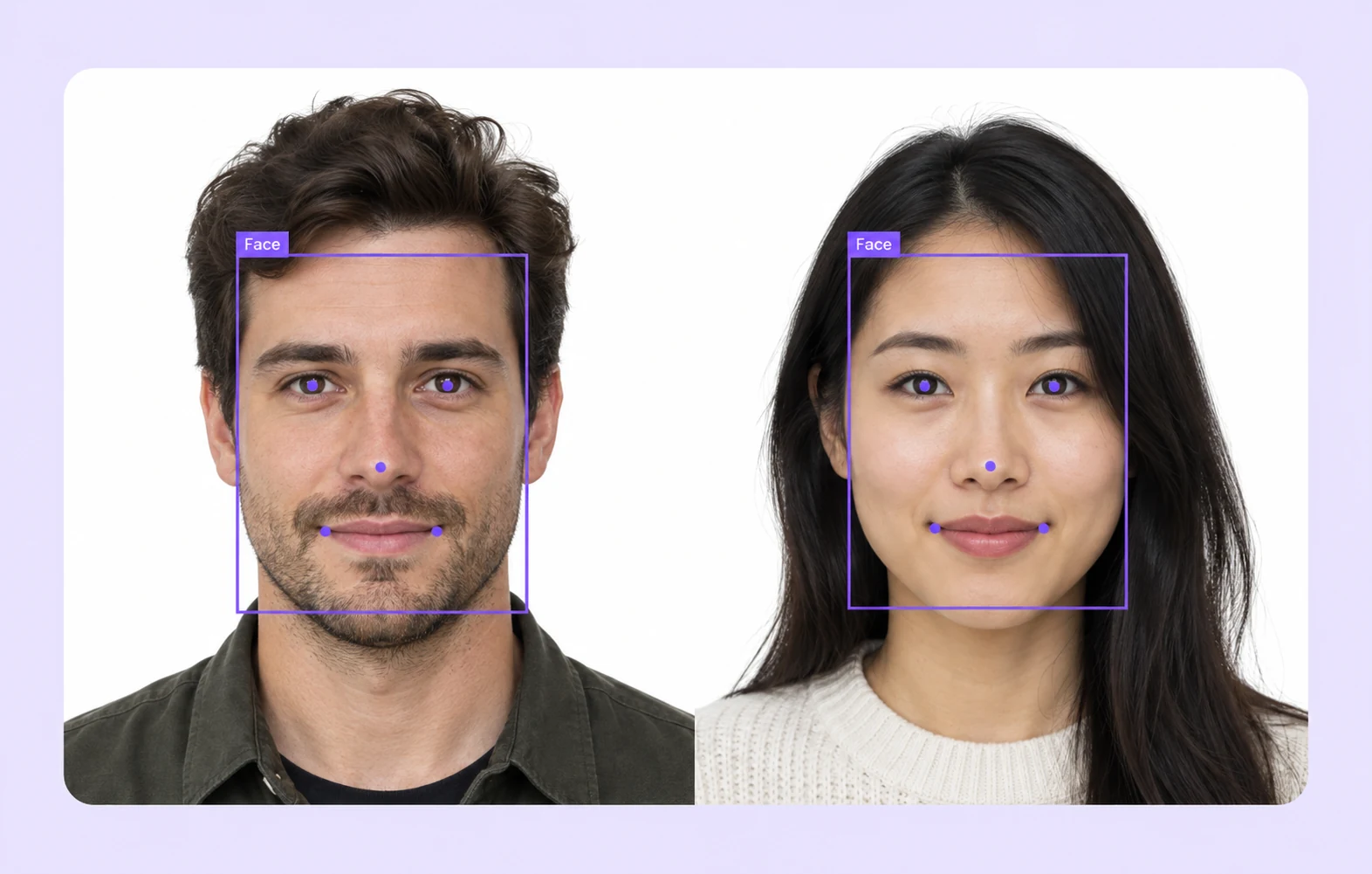
Facial Recognition Data Annotation & AI Labeling

Our advanced AI model for facial recognition delivers precise and reliable identification by analyzing facial features with cutting-edge algorithms. Designed for security, authentication, and surveillance applications, it ensures high accuracy in detecting, verifying, and recognizing faces in real time.
Collage showing security surveillance concepts: a man monitoring multiple screens, CCTV cameras, a man waving in a driveway, a person detected by facial recognition technology, and crowds with digital overlays in a public space.

Data Annotation for Facial Recognition

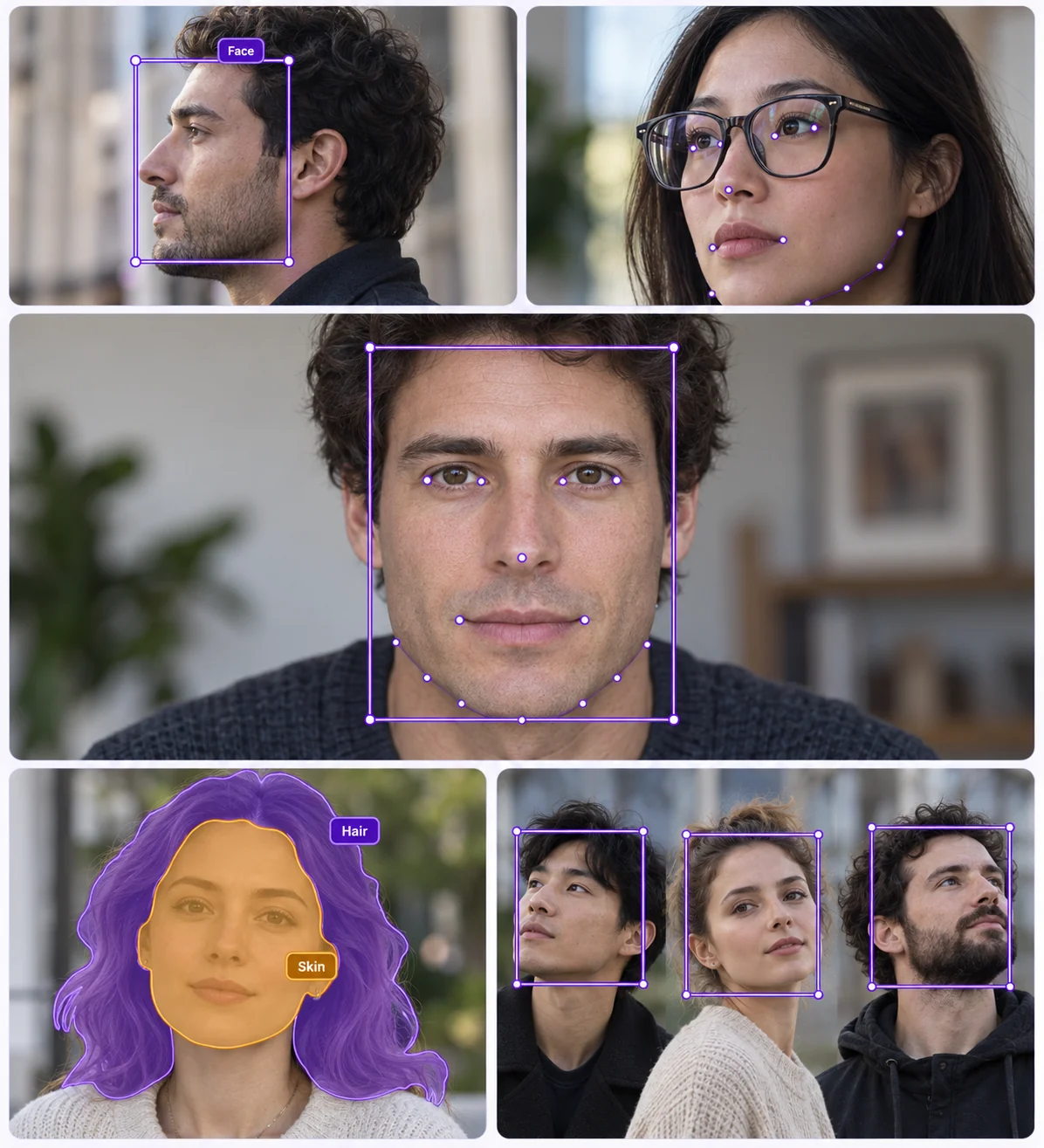
Data annotation for facial recognition involves labeling facial features in images and videos to train AI models for accurate identification and verification. This includes marking key points, bounding boxes, and segmentation to enhance detection, authentication, and emotion analysis, ensuring high precision in security, surveillance, and biometric applications.
Four professionals walking on a city street with digital facial recognition squares and ID info displayed around their faces.

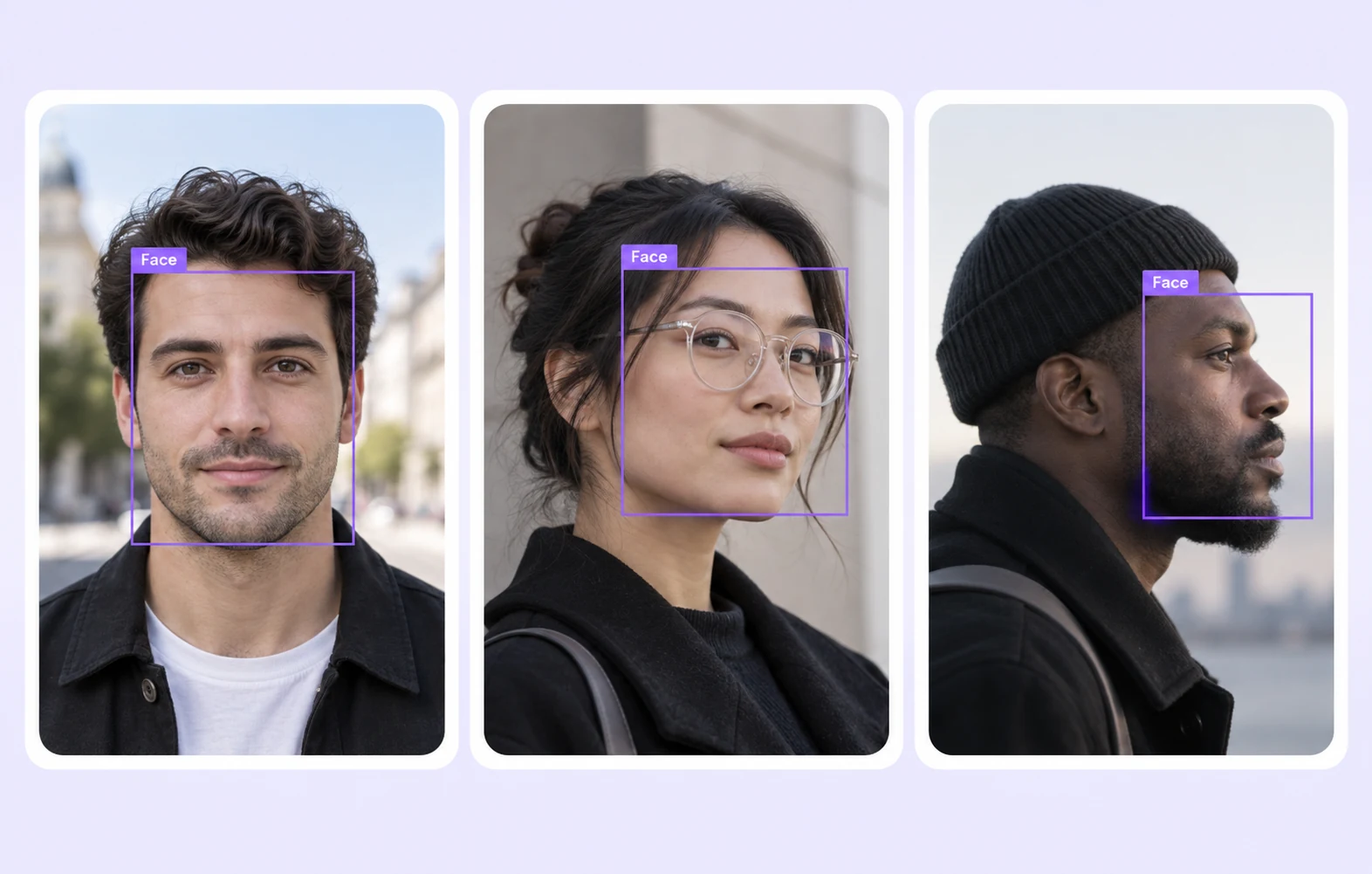
Detect and Locate Faces

Facial recognition technology enables accurate identification and verification of individuals using AI-powered image analysis. It enhances security, streamlines authentication, and improves access control in various industries, from surveillance to customer engagement.
Three business professionals walking on a city street with digital green face detection markers highlighting their faces.

Landmark Face Detection

Identifies and marks essential facial landmarks, including eyes, nose, mouth, and jawline, to enable precise expression analysis, emotion detection, and facial movement tracking. This data is crucial for applications such as biometric authentication, animated character modeling, and human-computer interaction.
Portrait of a woman with long brown hair smiling, with facial feature points marked around her eyes, eyebrows, and mouth.

Smile Detection

Detect and analyze smiles with advanced facial recognition technology, ensuring accurate, real-time emotion tracking for various applications.
Four-panel image showing two portraits: left panels display natural face photos, right panels show the same faces with colored facial segmentation maps highlighting features like eyes, nose, mouth, and ears in distinct colors.

Identifying and labeling multiple faces

Our advanced facial recognition technology detects, identifies, and labels multiple faces simultaneously. Designed for accuracy and efficiency, it enables seamless recognition across various applications, from security to user experience enhancements.
Top row shows three people with different facial expressions; bottom row overlays facial recognition green lines and points over the same faces.

3D Face Mesh Annotation

Generate precise 3D face mesh annotations to capture detailed facial structures and expressions. Ideal for AI training, augmented reality, and advanced facial recognition applications.
Close-up image comparing two eyes with digital overlays highlighting the irises and gaze points, the left eye has a blue iris and the right eye has a brown iris with eyelashes.

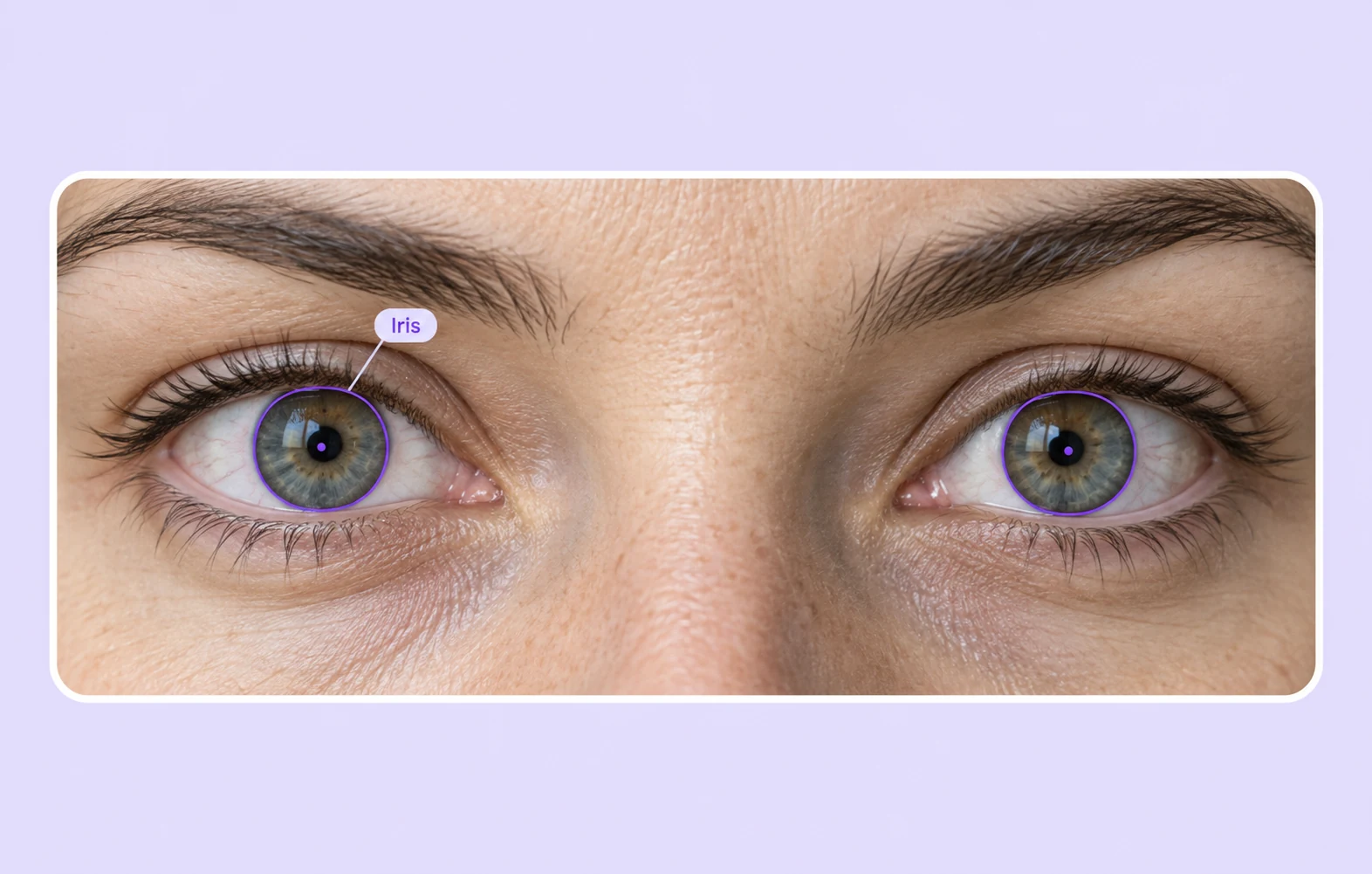
Iris and Eye Gaze Annotation

Accurately track iris position and eye gaze direction with detailed annotations. Ideal for AI-driven applications in biometrics, eye-tracking research, and human-computer interaction.

Why Unitlab?

Discover why Unitlab stands out as the ultimate solution for your data annotation needs.

15X

Faster Data Annotation
Orange square with a white check mark inside a white circle.
Auto Data Collect
Orange square with a white check mark inside a white circle.
Auto Data Labeling
Orange square with a white check mark inside a white circle.
Auto QA
Orange square with a white check mark inside a white circle.
Human-In-the-Loop
Orange square with a white check mark inside a white circle.
Model-In-the-Loop

60%

Free Up AI Engineer’s Time
Orange square with a white check mark inside a white circle.
Dataset Management
Orange square with a white check mark inside a white circle.
Dataset Version Control
Orange square with a white check mark inside a white circle.
Dataset QA
Orange square with a white check mark inside a white circle.
AI Model Integration
Orange square with a white check mark inside a white circle.
AI Model Validation

5X

Save AI Development Cost
Orange square with a white check mark inside a white circle.
5X cost saving in Data Collection
Orange square with a white check mark inside a white circle.
10X cost saving in Data Labeling
Orange square with a white check mark inside a white circle.
5X cost saving in AI Development

Annotation types

Facial recognition annotation includes bounding boxes for face detection, landmarks for key feature mapping, segmentation for pixel-level classification, 3D annotation for depth analysis, occlusion detection for hidden faces, and emotion labeling for expression recognition.
Group of five businesspeople walking outdoors with digital facial recognition boxes and ID numbers over their faces.

Bounding Box for Face Detection

Bounding box annotation for object detection in security helps AI systems identify and track objects such as people, vehicles, or suspicious items within surveillance footage. By drawing precise rectangular boxes around objects, security systems can enhance threat detection, automate monitoring, and improve response times.

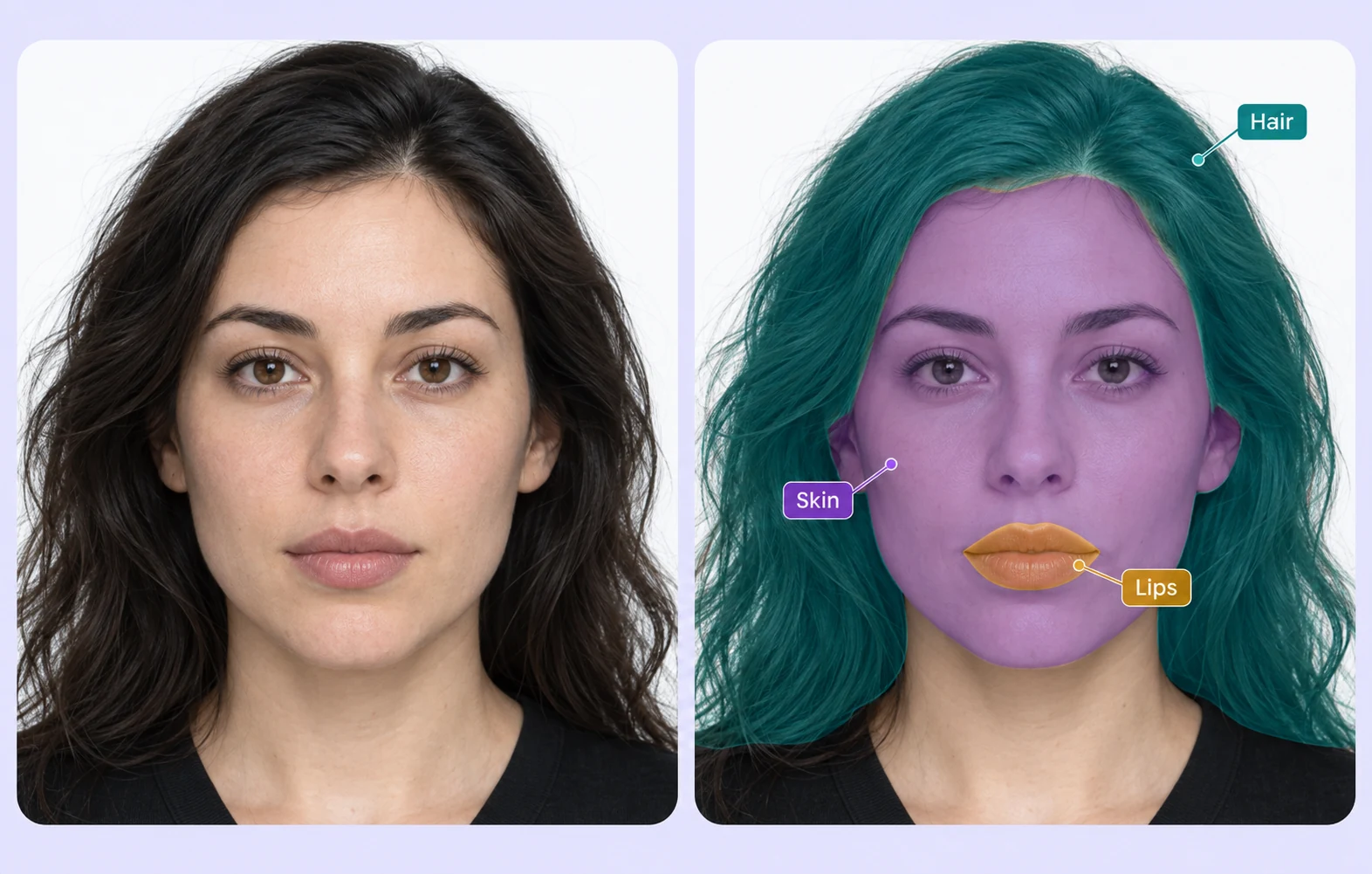
Segmentation for detecting faces

Accurately segment and detect faces using advanced AI-powered image processing. Ideal for facial recognition, security, and identity verification applications.

Side-by-side comparison of a man's portrait with his eyes blacked out on the left and the same image with colored segmentation highlighting facial features on the right.
Close-up of a smiling man with facial hair, with highlighted outlines around his eyebrows, eyes, and mouth.

Polygon for Smile Detection

Precisely detect and outline smiles using polygon annotation for accurate facial expression analysis. Ideal for emotion recognition, AI training, and user experience enhancement.

Frequently Answered Questions

Is Unitlab AI a free data annotation tool?

Yes. You can use Unitlab AI for free, no credit card required. The free plan is great for getting started and testing workflows. If you need more scale, advanced features, or custom setups, paid plans are available.

Can I change my plan after creating an account?

Yep. Start free and upgrade anytime. Most teams begin on the free plan and move to a paid plan once their datasets or team size grow.

What types of data can I annotate with Unitlab AI?

Unitlab AI supports multimodal data annotation, including image, video, audio, text, and DICOM. You can manage and annotate different data types in one platform using the same workflows.

Does Unitlab support AI-assisted and auto-annotation?

Yes. Unitlab AI includes built-in AI models to speed up annotation with auto-labeling, tracking, and segmentation. You can review, edit, and validate everything to keep quality high.

Can I use my own AI models with Unitlab AI?

Absolutely. Unitlab supports Bring Your Own Model (BYO) workflows. You can plug in your own models, combine them with Unitlab’s built-in models, and run multiple models in a single annotation workflow.

How does pricing for data labeling services work?

Pricing depends on the type of annotation, dataset size, number of classes, and complexity. Labeling services start from $0.02 per image, with custom pricing available for multimodal and large-scale projects.

Who has access to my data?

You do. With on-premises deployments, all data stays inside your own infrastructure and Unitlab has no access to it.
 If you use Unitlab’s hosted platform, your data is encrypted and isolated, and is not visible to Unitlab staff. Access is strictly controlled and limited to your team based on roles and permissions.

Does Unitlab support team collaboration and review workflows?

It does. Unitlab is built for teams, with support for multiple annotators, reviewers, approval steps, and full annotation history so nothing gets lost.

Can Unitlab handle large datasets and production workloads?

Yes. Unitlab is designed to scale, from small experiments to production-level data annotation. Teams use it to manage large datasets, complex workflows, and long-running annotation projects.

Didn’t find the answer you are looking for? Contact our support

Save Both Time and Money!

Why AI Teams Choose Unitlab

One platform to manage, annotate, and curate training data across every modality, helping teams move faster while staying efficient at scale.

15X

Faster Data Annotation
Orange square with a white check mark inside a white circle.
Auto Data Collect
Orange square with a white check mark inside a white circle.
Auto Data Labeling
Orange square with a white check mark inside a white circle.
Auto Model Validation
Orange square with a white check mark inside a white circle.
Auto QA
Orange square with a white check mark inside a white circle.
Auto Model-In-the-Loop

60%

Free Up AI Engineer’s Time
Orange square with a white check mark inside a white circle.
Dataset Curation
Orange square with a white check mark inside a white circle.
Dataset Version Control
Orange square with a white check mark inside a white circle.
Dataset QA
Orange square with a white check mark inside a white circle.
AI Model Integration
Orange square with a white check mark inside a white circle.
AI Model Validation

5X

Save AI Development Cost
Orange square with a white check mark inside a white circle.
5X saving in Data Collection
Orange square with a white check mark inside a white circle.
10X saving in Data Labeling
Orange square with a white check mark inside a white circle.
5X saving in Dataset Curation
Orange square with a white check mark inside a white circle.
5X saving in AI Development
Orange square with a white check mark inside a white circle.
5X saving in Model Validation
15X
Faster Data Annotation
60%
Free Up AI Engineer’s Time
5X
Save AI Development Cost